- Details
- Hits: 3338
It's been a long time since the last update, so here is some news. The assembler and editor part is almost complete, with many major and minor improvements, especially regarding MADS. The whole project has been restructured to allow the addition of C64 assemblers and the new "Graphics" plugin. This plugin is what I've always wanted to have ever since I started cross-platform development back in 1990. For almost 20 years, I've been converting graphics to and from my Atari using "for" loops and any language you can think of. However, I never completed the interactive converter with the parameters I dreamed of. The first trial was done in the language "E" on my Amiga, and the next was done in Delphi on my PC. Both could never be finished. But now there is Eclipse and SWT and finally a first working version. Some parts of SWT are far more complex than my Amiga or on the PC with Delphi controls. For example, I took three days and two tutorials to scroll and resize the image area properly. On the other hand, you get high execution speed and flexibility, and it will run under any operating system.
The alpha version will be part of WUDSN IDE 1.4.0. It includes loading and displaying fonts, bitmaps, and sprites from Atari and C64 and creating ".cnv" conversion parameter files so you can repeat the conversion, for example, when the original files have changed. The conversion will also work in the other direction, of course. New converters are pluggable via an extension point. 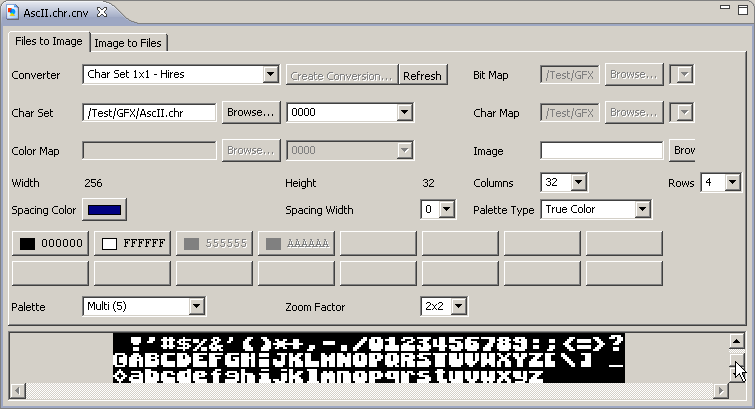
- Details
- Hits: 5039
Welcome to the "M&M" release featuring support for Mac OS X and MADS content outline. You can use the menu entry "Help/Software updates/Available Software" to update from version 1.2.0 to 1.3.2. Note you have to uninstall version 1.2.0 explicitly before installing version 1.3.2, this time because of the restructuring of the packages and extended preferences settings. After the installation, you must set some preferences again since more options are available now, and some have moved. 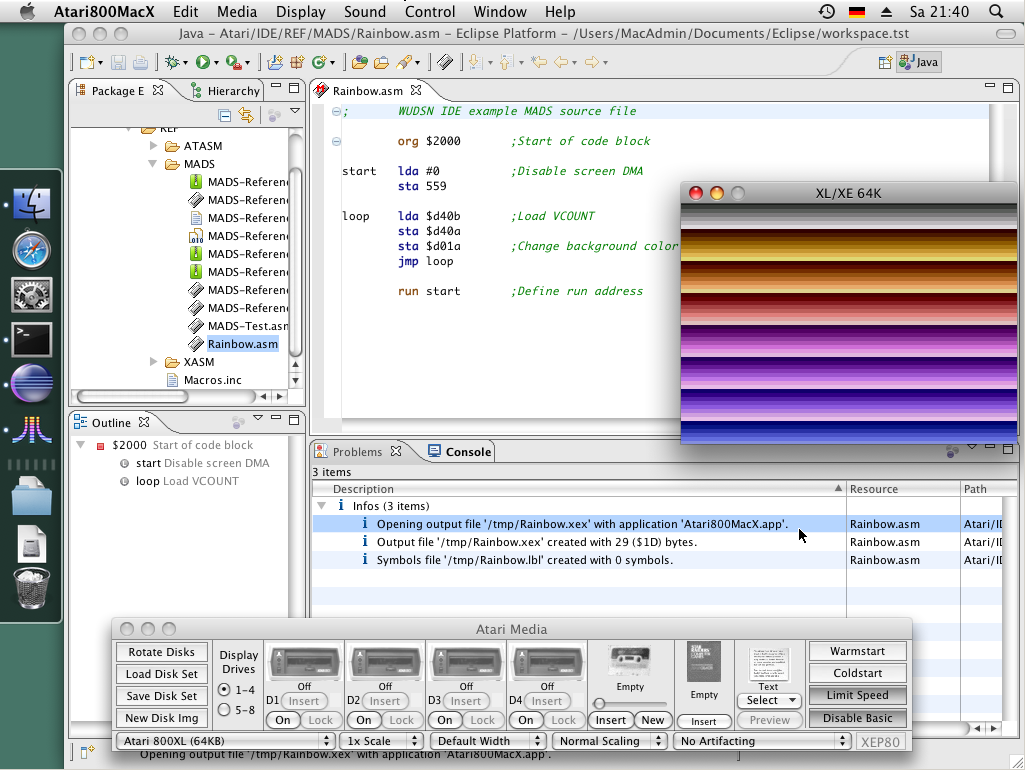
Features: See the tab "Features" on WUDSN IDE for screenshots
- Support for Mac OS X consists of the corresponding binaries for Mac OS X (Intel and PowerPC) contained in the updated download package and the support for Mac OS X default application. This means that by default, the same application is used to open the output file as is typically used when you open the file in the Finder. See the news from 2009-07-22 for the details on the binaries.
- Support for MADS content outline currently handles labels, equates "ORG", ".PROC", ".MACRO", ".LOCAL," and ".IF" directives, as well as all binary and source, include directives. You can open the view via the menu "Window/Show View/Outline" if it is not open. The parsing support is not complete yet but is usable already. Completing it is my next primary task. One restriction should not disturb you: If you place opcodes or directives in the first column, they are considered labels. This is to keep parsing fast for performance reasons and will probably remain for performance reasons in subsequent releases. But as mentioned before, this is not the case in regular source code anyway, so it should not hinder you from anything.
- Split preferences pages for editor settings and compiler plus emulator settings.
- Dedicated support for Atari++, Atari800MacX, and Atari800Win in the preferences, including a download link, default command line, and explicitly specified command line to open the output file.
- An application or emulator to open the output file can be configured per compiler.
- When using "Compile and Run", the selected application is output as an info message.
- Configurations for different emulators and one user-defined application can be maintained in parallel, which is helpful for testing.
- Support for zero-configuration start of the emulator based on the default application based on the file extension specified for the output file.
Fixes:
- The content outline sometimes only found the first macro definition.
- Folding did not show up in all situations.
- Under Mac OS X, the file select dialog can now choose an "*.app" application, for example, "Atari800MacX.app", even though this is a folder. The solution is a workaround for a general Eclipse problem under MacOS X. See BUG 82155.
Site Update:
- Section "Preferences" was split into "Preferences for editing" and "Preferences for compiling.
- Section "Installing Atar800Win" renamed to "Installing Atari800Win and other emulators", rewritten and extended"
- Feature section updated with new screenshots.
- Details
- Hits: 3153
- The archive containing all supported Atari compilers has been updated. It now includes the Linux versions I provided and CAS and the Mac OS X versions provided by Spookt. Thanks a lot to Tebe for the update of MADS, so it runs smoothly under Mac OS X and Linux now. The most recent version of the following table is available on the tab "Installation" on WUDSN IDE from now on.
Compiler Operating System Architecture Compiler Version Executable Path ATASM Windows Intel - 32 bit 1.06 ATASM / atasm.exe ATASM Mac OS X Intel 1.06 ATASM / atasm.macosx-intel ATASM Mac OS X PowerPC 1.06 ATASM / atasm.macosx-powerpc ATASM Linux Intel - 32 bit 1.06 ATASM / atasm.linux-i386 MADS Windows Intel - 32 bit 1.8.8 MADS / mads.exe MADS Mac OS X Intel 1.8.8 MADS / mads.macosx-intel MADS Mac OS X PowerPC 1.8.8 MADS / mads.macosx-powerpc MADS Linux Intel - 32 bit 1.8.8 MADS / mads.linux-i386 XASM Windows Intel - 32 bit 3.0.1 XASM / xasm.exe - The description of how to configure the "Problems" view correctly is now included in the "Installing Eclipse" section and the FAQ. This step must be performed once after the installation since the default configuration is unsuitable for assembler files.
- Details
- Hits: 4758
After a significant rework, many new features were added, and the first usable version of the MADS integration is now available. Now "only" content outline and label file creation are unavailable. I know many people are waiting for the content outline, but I first had to get the syntax for all definitions of pseudo opcodes and directives straight and extend the parsing to block comments. Otherwise, parsing for a content outline is not possible. And comparing the 61 definitions in ATASM (described in an English manual) to the 168 (!) definitions in MADS (described in a Polish manual), you may understand what kept me busy in the past weeks. And without the incredible support from Tebe for the technical details, it would not have been possible! Also, my wife did a great job translating the MADS manual's relevant sections for me, so thanks for that!
Unfortunately, starting the emulator automatically on Mac OS X does not work. But I have a Mac OS X emulation up and running now for my tests and found out that the problem is passing parameters to the "open" command and the binary file name.
You can use the menu entry "Help/Software updates/Available Software" to update from version 1.1.0 to 1.2.0.
Features: See the tab "Features" on WUDSN IDE for screenshots
- Syntax highlighting is complete for all MADS pseudo opcodes and directives.
- Compiler log parsing and source positioning complete for MADS, including recognition of errors from source code, include files.
- New menu entries to directly open the source and the output folder.
- A new console view with the original compiler output opens automatically in the background after compiling, which is helpful in cases where the plugin is incomplete.
- ATASM ".bank" warnings are mapped to info messages.
- The size of the output file is now also given in hexadecimal notation.
- Support for several single-line comment delimiters per compiler.
- Support for several multiple lines comment delimiters per compiler.
- Support for several string delimiters per compiler.
- Automatic append of ".asm" extension for "ICL" source code includes in MADS if the extension is missing.
- Automatic append of ".asx" extension for "ICL" source code includes in XASM if the extension is missing.
- A new "Open Folder" context menu is available for all folders and files.
- New "Sort" context menu with a sub-menu available for all text files.
- The "Open with Hex Editor" context menu entry now supports multi-file selection.
- Preferences automatically activate the tab for the compiler of the active editor upon opening.
- Handling and messages for misconfiguration and errors during the launching of the compiler and emulator have been improved.
Fixes:
- The "OK" and "Apply" buttons in the preferences are now always enabled, irrespective of the specified compiler and emulator paths.
- Focus back in the editor window after compiling.
- Automatic positioning to the line of the first error or warning after compiling.
- Syntax highlighting of illegal opcodes fixed, now also uses the preferences setting.
Site Update:
- A new section, "Is there source version control?" was added to FAQ.
- A new section, "Why is ATASM the primary compiler?" was added to FAQ.
- Feature section updated with new screenshots.
- Configuration of file associations added to section "Installation".
- Details
- Hits: 3574
Thanks to Thorsten, the webmaster of www.nizagam.org, for creating a fantastic impression of this historical moment in 1992. Funny, when I started this site, I tried to do precisely the same using a face-morphing program. Well, the result was an epic fail. So I have added Thorsten's excellent version to the FAQ section.